Play history and local statistics, safer game stopping, durable recording, and new Nintendo DS, PlayStation 3, and PSP sources.
Play history and statistics
Open Stats for recorded play, top games, hourly patterns, streaks, achievements, and backlog habits. Export a local PNG card with the recording period clearly labelled. Imported lifetime totals stay separate. Desktop and Couch Mode are supported.
See running sessions on Home, browse older history, and delete finished sessions with confirmation. Deletion preserves imported playtime and later recorded play.
Stop one game or all attributable games. Previews explain shared Wine/Flatpak scopes; idle installations and documents open in editors are excluded. Recognize Steam Proton games whose process paths use Steam's container drive, and stop their verified prefix processes when no system wineserver is installed. Wait briefly for a forced process to exit before reporting the result.
Record supported file-picker loads on Hyprland. Optionally pause recording when the emulator loses focus, or show the current game through Discord Rich Presence.
Fix imported/recorded playtime overlap, recovery timestamps, stale title matching, Discord reconnects, and partial history deletion on storage failure.
Keep Stats totals and charts consistent across midnight, New Year and DST. Paused historical sessions use labelled timing estimates. Storage errors prevent card export.
Remember the selected Stats period, count linked installations consistently, and fit longer notes inside the exported card. Headles
Xenia (Xbox 360) support and a TV setup for the couch.
Xbox 360 games from Xenia Canary: discovery from Xenia's recent-games list and storage root, save backup, playtime recording, and launching through the xenia_canary binary. Thanks to @Salt-555 for the Xenia source work.
Xbox 360 titles identified with IGDB and shown under their own console card, including names Xenia writes with trademark marks.
Xenia pinned to X11 on Wayland, where its window otherwise stayed grey while audio kept playing.
An optional TV gaming agent skill with a Gamescope launcher that checks the TV output, workspace, and audio sink before starting a game. It stays inert unless you install it. Thanks to @LucasOl1337 for the guide and helper.
Add an optional ProtonDB tier badge on library cards, off by default. Turn on both community reports and card badges in Settings to see the tier beside playtime and rating. Fixes #39.
This patch fixes RomM catalog refresh for large libraries.
Ask RomM to omit the result-set index and filter data it repeats on every page by default, which is what pushed large catalogs past the response limit.
Raise the whole-refresh total while keeping each page bounded in memory, so libraries with tens of thousands of entries finish loading. A failed refresh still keeps the existing offline catalog.
Omakade 1.9 adds RomM libraries, per-game launch setup, emulator save protection, and tools for fixing your library.
New features
RomM libraries: connect your server, launch locally mounted games, and browse the cached catalog offline. Credentials are stored securely; Omakade does not modify your server.
Launch setup: choose an emulator or core for each installation, inspect launch diagnostics, and repair missing paths.
Save protection: back up supported emulator saves before launch, restore or undo changes, and manage custom layouts, retention, and cleanup. Shared memory cards include warnings before restoring.
Library repair: work through missing artwork, identification problems, and unavailable installations with saved filters, selected retries, and separate identity and artwork undo.
Game details: view play history and optional ProtonDB community reports. Library cards keep their compact two-line layout.
Fixes
Improve ROM identification and artwork recovery while preserving manual choices and editions.
Fix cached cover loading loops and refresh backup lists after automatic capture.
Keep archive launches on compatible RetroArch setups and explain missing archives, cores, or runtimes.
Skip GOG DLC-only manifests so they do not block game discovery.
Recognize Cemu .wua games in session recording.
Thanks
Thanks to @gotar for reporting the GOG DLC scanning bug and @ksavery for suggesting ProtonDB integration. Thanks to everyone contributing reports, ideas, and testing.
Omakade 1.8 adds a Home screen, an Up Next queue, and more ways to browse your library.
Find games by genre, decade, or platform, with richer descriptions, credits, and regional release dates.
Choose identities and artwork in one panel, with better protection for existing covers.
Get smoother controller navigation, clearer launch feedback, and reliable focus when returning from details.
Optionally record emulator sessions and see imported and recorded playtime separately.
Include game identity choices, play history, and preferences in personal backups.
Keep ROM Folders visible on the Sources overview.
Session recording requires a recognizable game path in the emulator command line. Paused emulator time counts; internal game changes and some wrappers are not covered. Personal backups do not include emulator saves.
Packages are available for x86_64 and ARM64. Both passed automated build, test, and package lifecycle checks. ARM64 has not been tested on physical hardware.
Omakade 1.7 brings console libraries, more ways to organize your games, and a reworked controller keyboard.
Console libraries
Discover Dolphin, Cemu, and shadPS4 games alongside existing sources. Launch Dreamcast games through Flycast and scan ROM folders and EmuDeck layouts.
Browse console cards or individual games, pin games outside their console card, and choose a layout for each system.
Read titles and icons from supported Switch dumps using locally installed keys, and artwork from Wii U archives. Filter out Switch updates and DLC.
Artwork and settings
Identify games with IGDB, display ratings, and sort by rating or popularity. Matching handles common region, revision, and translation tags in ROM names.
Add optional SteamGridDB portrait covers, or choose your own cover, hero, and logo images. Each artwork slot can be reset separately.
Browse settings by Sources, Library, Connections, Controls & streaming, and About & storage. Adjust desktop and couch cover sizes independently.
Organization and backups
Add native games and desktop entries with custom arguments and a working directory. Removing an entry leaves its game files alone.
Choose a preferred installation for linked games and add extra GOG folders.
Bulk-edit games, save named filters, and pick a random game from your results.
Export personal library settings and artwork to a local backup. Preview, merge, or replace data, with recovery and undo for interrupted restores.
Preserve console pins and favorite/hidden choices for the new emulator sources in backups
Launch, manage, and install Steam games through the Steam client itself, native first and then Flatpak, and only fall back to the desktop steam:// URL handler when neither is available. Steam packages that register no handler sent Play to the web browser. Thanks @radiohost-cloud for the report and the Apple Silicon test.
Stop matching the Omakade desktop entry when searching for "Steam" or "RetroArch" in the app launcher. Thanks @gmickel for the report.
Remember the library sort order between launches.
Show every game's cover at the same compact size on the details screen instead of letting portrait covers render larger than landscape ones.
Share QML role-name definitions across nine game models without changing their role IDs, names, or behavior.
Browse, search, organize, and launch games with a controller in the new Detail and Grid views. Switch with F11 or controller Start, or launch with omakade --couch.
On-screen keyboard, controller-friendly settings, and clearer selection.
Selection stays put when switching views.
Launched games keep controller focus. The cursor hides during controller use and returns when you move the mouse.
GOG and Battle.net
Direct GOG discovery and launching: native Linux games run directly; Windows game builds run on Linux through UMU. Heroic-managed games keep their existing launch settings.
GOG rescans remove uninstalled games and keep cached entries when Heroic’s inventory cannot be read.
Fixed Omarchy Battle.net prefixes being detected as Wine instead of Proton. Rescan your library after upgrading to correct cached entries. Thanks @TheAirick for the report.
Downloads
Packages are available for x86_64 and aarch64, with checksums, SBOMs, and provenance.
Both architectures passed automated build, package, launch, and lifecycle tests. ARM64 still needs testing on an Omarchy device; additional real-library compatibility reports are welcome.
Added optional RetroAchievements support for RetroArch games, including compatible ROM hashing, achievement progress, unlock details, rarity, and account-aware caching.
Kept network, hashing, and database work off the interface thread and handled sign-out, stale data, unsupported systems, and malformed responses safely.
Battle.net
Added Battle.net as a library source. Omakade finds the Windows Battle.net client in Wine, Proton, and Bottles prefixes, imports installed games from product.db, and launches them through Battle.net.
Downloads missing Battle.net covers and banners from Lutris's public artwork hosts, including Heroes of the Storm.
PCSX2 and Ryujinx
Added PCSX2 as a game source: imports disc-based games from the current gamelist cache (v34) for native and Flatpak installs, with cover art, playtime, last-played, and region metadata, and delegated launching through the owning PCSX2 install. Sources are discovered automatically and appear once the emulator is detected.
Added Ryujinx as a game source: discovers XCI, NSP, and NRO games from the configured game directories for native and Flatpak installs, with custom titles, playtime, and last-played metadata, and delegated launching.
Added per-source filter chips, status rows, and rescan controls for both emulators in Settings.
Steam
Imported non-Steam shortcuts from shortcuts.vdf, including Wine/Proton games added to Steam, and launched them with the 64-bit shortcut ID Steam expects.
Added optional owned Steam library sync, installed and ready-to-install filters, and Steam installation handoff.
Loads owned-game covers as they enter the visible library instead of fetching an entire account at once.
Kept the Steam library when a configured library path is missing or a manifest is unreadable instead of showing an empty or frozen library.
Skipped unusable entries and Steam tools during owned-library sync instead of failing the whole sync.
Remembered games without Steam achievements instead of re-requesting them on every visit, and reported that state plainly.
Required a 17-digit Steam ID, reported when Steam is still busy, and stopped re-requesting covers Steam does not have.
Heroic, RetroArch, and Lutris
Added games sideloaded into Heroic, plus Heroic playtime and last-played activity.
Resolved the RetroArch Flatpak's sandbox paths so its playlists, thumbnails, and playtime logs are found, and matched playtime logs by the core's short name and archived content name.
Ignored a leftover Lutris database whose native or Flatpak launcher is no longer installed, and checked Flatpak launchers without blocking the interface.
Navigation and library
Added controller navigation across library modes, source filters, organization controls, Settings, and game details.
Moved keyboard and controller Up from the top row of games into the filters and toolbar, with arrow keys between those controls and Down back into the grid.
Kept detail-page controller movement in content order below collections.
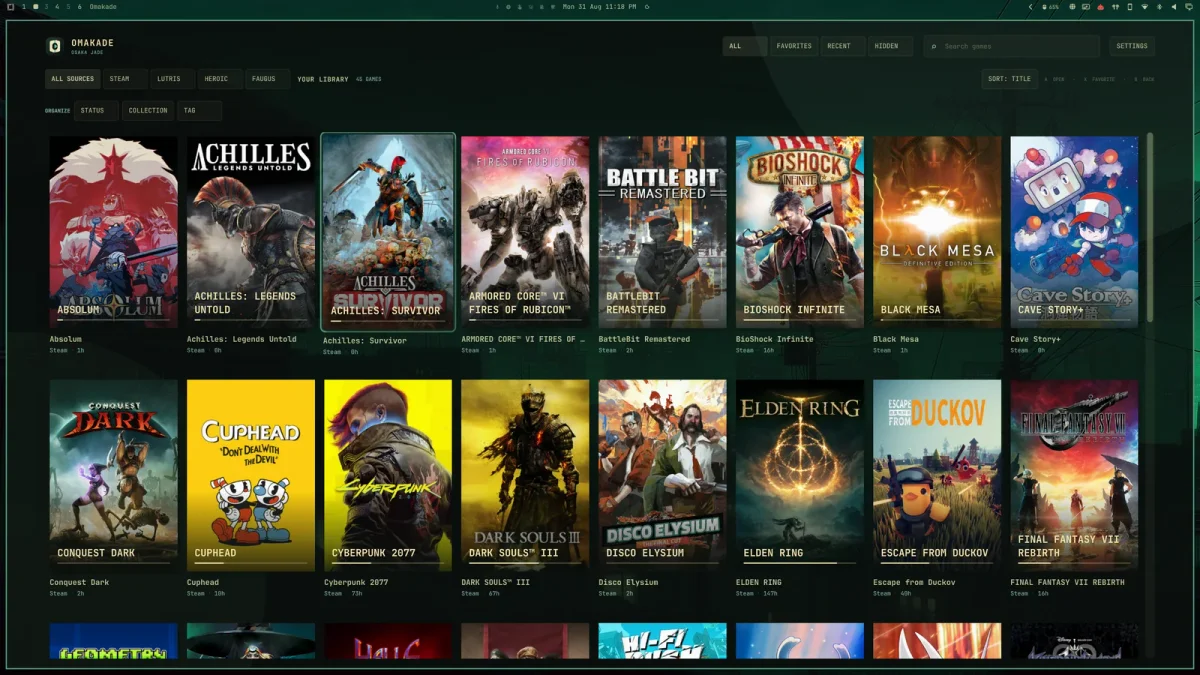
 Omakade v1.12.0 NEW