Lossless rotate and flip. A JPEG rotated or flipped with no crop or resize is written without recompressing the pixels (through jpegtran where available), so a turn no longer costs quality; every other correction recompresses as before. An image with an EXIF orientation tag still takes the recompressing path, which bakes the tag in.
Crop aspect presets. The correction editor holds the crop to Free, Original, 1:1, 4:3, 3:2 or 16:9 while the frame is dragged, snapping to the largest centred rectangle of that ratio when the preset is chosen.
Straighten. A fine ±15° level control in the correction editor, scaled to fill the frame so no empty corners show, applied before the crop.
Correct a selection. Rotate, flip or resize several selected pictures at once (B), each written as its own copy with the existing collision handling.
PDF continuous scroll. Pages scroll at the window width by default, with a Fit page mode for reading a whole page with zoom and pan.
Print. A Print action for pictures and PDFs hands the file to the system print path (CUPS), and is greyed out with an install hint when it is absent.
Undo organization marks. Ctrl+Z steps back through favourites, hidden flags, ratings and captions, one action at a time.
Subtitle timing. Sidecar subtitles can be nudged earlier or later by half a second to fix a track that is out of sync.
Slideshow options. The slideshow interval is configurable (2 to 20 seconds) and a shuffle mode picks a random picture instead of the next in order.
Crop, rotate, flip and resize a picture as a copy. The viewer's action list gains Crop, rotate, resize (Q): a live preview with a draggable crop frame, quarter turns and flips, and an optional output size. The original is never modified; the copy is written beside it as <name>-edited.<ext>, numbered on repeat. EXIF orientation is baked in, the ICC profile is kept, and collision or write failures leave the original untouched.
Rename an album or a tag without losing its membership. Renaming a tag also renames every tag nested under it (Travel/Japan follows Travel). A name that clashes with an existing collection is refused.
Compare pictures side by side with synchronized zoom and pan (K). It uses the checked selection, or the open picture's exact duplicates and then its visually similar set, and shows each file's name.
Remember video playback. Volume and mute are kept across files and sessions, and a video reopened part-way through offers Resume or Start over instead of always starting from the beginning. Watching to the end clears the spot.
External subtitles. A .srt or .vtt beside a video is offered alongside any embedded tracks, labelled by its language tag (movie.en.srt shows as English), and drawn over the video as playback reaches each cue.
Find text in a PDF. The viewer's PDF controls gain a search box; each match is a page you can step through, with a count, and the page turns as you move between matches.
Copy a PDF page's text to the clipboard, and jump straight to a page by typing its number in the PDF c
Star ratings. Rate a file from the viewer or with Alt+1 to Alt+5, sort by Top rated, and narrow any view to a minimum rating from Browse. Saved views keep the choice.
Captions. Add a short caption in the viewer; it shows on the tile and is searched with filenames and picture text.
Nested tags. A tag named Travel/Japan sits under Travel in Browse, and choosing the parent shows everything beneath it.
Browse a photo library by camera and lens. The metadata pass that reads capture dates now records the camera and lens too, and saved views keep the choice. Libraries without camera photos do not show the section.
Tab and Shift+Tab step through the sections, wrapping at either end.
Changed
A video that plays to its end rewinds to its first frame and pauses there instead of leaving a blank stage.
Open multiple selected files in order, including across folders and in an already-running window. Explicitly selected hidden files open without scanning their surrounding folders.
Opt-in startup readiness tracing and a reproducible startup benchmark.
Changed
Video setup is deferred until a video is opened, reducing startup work for images and the library.
Numbered filenames sort naturally, so image2 appears before image10.
Copying extracted text is confirmed visually and through accessibility announcements.
Real video rendering checks run under Mesa OpenGL in CI and release validation, and automated playback stays off physical audio devices, including native PipeWire.
Fixed
Thumbnail, PDF and matte image responses no longer risk a crash when a request is cancelled or finishes during fast scrolling or a tile size change.
Tiles no longer keep a previous file's thumbnail after the window or tile size changes, which could open a different file than the one shown.
Image previews now include actual-size viewing, horizontal and vertical flips, a checkerboard behind transparency, zoom up to 64 times the fitted size, and Space to pause animated GIF and WebP files.
Video playback now includes standard Space, mute, volume, seek, speed, audio track, and subtitle controls. Double-clicking the video toggles fullscreen.
SVG, icons, JPEG 2000, JXL, QOI, PSD, DDS, EXR, and TGA images can be scanned and opened directly when the packaged image plugins are installed.
Changed
Videos start with sound, play once, and preserve an intentional pause when the window is minimized and restored.
Fixed
Browse stays fully visible at the minimum window width.
Closed matte previews no longer reload their previous file when the window changes size.
Opening a PDF directly from a file manager no longer rejects it as an unsupported media file.
Space in a video preview now pauses or resumes playback instead of launching the configured video action.
Extracted image text now opens in a selectable review sheet with preserved line breaks, Copy selection, Copy all, retry, and temporary corrections.
The viewer action list supports Tab, arrow keys, Enter, Space, and accessibility activation. Shortcut tooltips now use the live bindings.
QR actions appear only after a QR code is detected in the open image.
OCR search results show the matching text when the filename did not match.
Changed
Copy to clipboard is now Copy image.
Browse is now a bounded, searchable library panel with direct source, folder, album, duplicate, and add-folder controls. Folder labels are concise while the parent path and recursive item count remain visible as context. Search filters the choice model before rows are created, and reopening Browse returns to the active folder or album.
Extract Text retries sparse screenshots once when the normal OCR pass finds almost no text. Results still share the same private cache.
Extract Text takes priority over background OCR and stops its current pass when the review closes.
Viewer actions keep keyboard focus when moving between files or closing a nested sheet. Extracted text receives focus as soon as it is ready.
Large libraries use indexed path lookups and bounded image metadata batches. OCR queues start and stop without hashing every path.
Libraries with more directories than the inotify safety cap get a periodic worker rescan, while ordinary watcher updates only change affected paths.
Fixed
First-run media date indexing publishes one settle
Clear folder sources in Settings. Omaroll lists the Omarchy and XDG folders it detects automatically, combines roles that resolve to the same path, and marks unavailable paths. Added folders stay saved so removable storage can return later.
Original media dates. General photos use EXIF DateTimeOriginal or DateTimeDigitized, and videos use their embedded creation time, so files copied into a watched folder still land on the day they were made. Omaroll reads one file at a time after discovery, caches both found and missing dates by file identity, and never overrides a timestamped capture filename.
Find exact duplicates. Browse opens a read-only review that compares only same-size candidates, hashes them off the interface thread, keeps matching sets together, and updates when files change. It never removes anything.
Save the current video frame. The viewer hands its exact playback position to ffmpeg, writes a timestamped PNG beside the recording, and tracks the result without changing the video.
Rename in place. The sheet keeps the media extension fixed, refuses an existing filename, and carries favourites, hidden state, and album membership to the new path.
Search inside pictures. Filename results appear immediately, then local Tesseract indexing adds screenshots and photos containing every search term. It starts only while search is active, runs one file at a time, pauses after the current file when search clears, and reuses a private, identity-checked cache pruned to 64 MB at startup. Progress is visible, and Settin
Transcode actions always show a result. A running transcode pins a "Making ..." line in the footer and selects the finished file in the grid, and pressing an action whose output already exists opens the viewer on it.
Existing outputs are verified with ffprobe before being trusted, so an empty or truncated file left by an interrupted run is cleared and remade instead of blocking every retry as "already done".
A -720p.gif, -1080p.mp4 or -4k.mp4 renders its thumbnail from the source video beside it, so a recording and its conversions show identical tiles instead of three different frames of the same content.
A recording's tile returns to its resting frame when a hover scrub ends, instead of parking on whatever frame the hover left it at.
An animated GIF with no source beside it thumbnails at the same percent-in moment as a video, rather than always its first frame.
The thumbnail cache regenerates lazily on first view after upgrading.
Clip to GIF, Resize to 1080p and Convert to JPEG used to be fire-and-forget: the new file blended into the library with no word about where it went, a transcode's output sat in the grid as a broken zero-byte tile while ffmpeg worked, and if the run died the tile stayed broken forever with no explanation. Transcodes are now followed to the end.
Fixed
You can see where the file went. When a transcode finishes, the library rescans, the status line says the new file was saved beside the original, and the grid selects and scrolls to it. If the current filter would hide it, the view clears to show it, the same way "Open with Omaroll" does; otherwise your filters are left alone.
No more broken tiles mid-transcode. The output file is held out of the library until the tool finishes, so the zero-byte in-progress file never appears as a broken entry, and its thumbnail is only made once the file is complete.
Failures are cleaned up and explained. A transcode that dies leaves no partial file behind, and the tool's own last error line is quoted in the status message instead of silence.
No more false "already done". Running the same transcode again while one is in flight says "Still working on ..." instead of mistaking the half-written file for a finished one.
Stale entries fix themselves. Finished transcodes are rescanned even though writing into an existing file fires no directory event, which was why a thumbnail made from a half-written file used to stay broken until restart.
Omaroll now resolves theme colors the way Omarchy itself does. Before this release, only themes with a fully semantic colors.toml followed your theme; anything else quietly fell back to Omaroll's built-in green look.
Fixed
Compact terminal palettes follow the theme. A colors.toml that defines only background, foreground and color0..color15 (the format many third-party and Ghostty-derived themes use) now resolves through the same alias cascade as omarchy-theme-color: ANSI names map to semantic names, muted, selection and the foreground variants follow the same fallback chains, missing dark and darker background shades are derived with the same 25% and 50% black mixes, and light or dark mode is detected with the same precedence and luminance threshold.
Accent falls back to the terminal blue. When a theme defines no accent, Omaroll takes color4, exactly like the Omarchy shell, instead of showing the built-in green accent.
Legacy names and the Omarchy 3 layout work again. Themes using the old short names (bg, fg, dark_bg, ...) resolve correctly, and a theme installed under ~/.config/omarchy/current is found when the Omarchy 4 state root has none.
The state root matches Omarchy. Omaroll reads the fixed ~/.local/state/omarchy/current path that Omarchy's own scripts use, rather than honouring XDG_STATE_HOME when Omarchy does not.
Machine-level launcher overrides apply. A [launcher]background or background-alpha in ~/.config/omarchy/shell.toml overrides the theme's values,
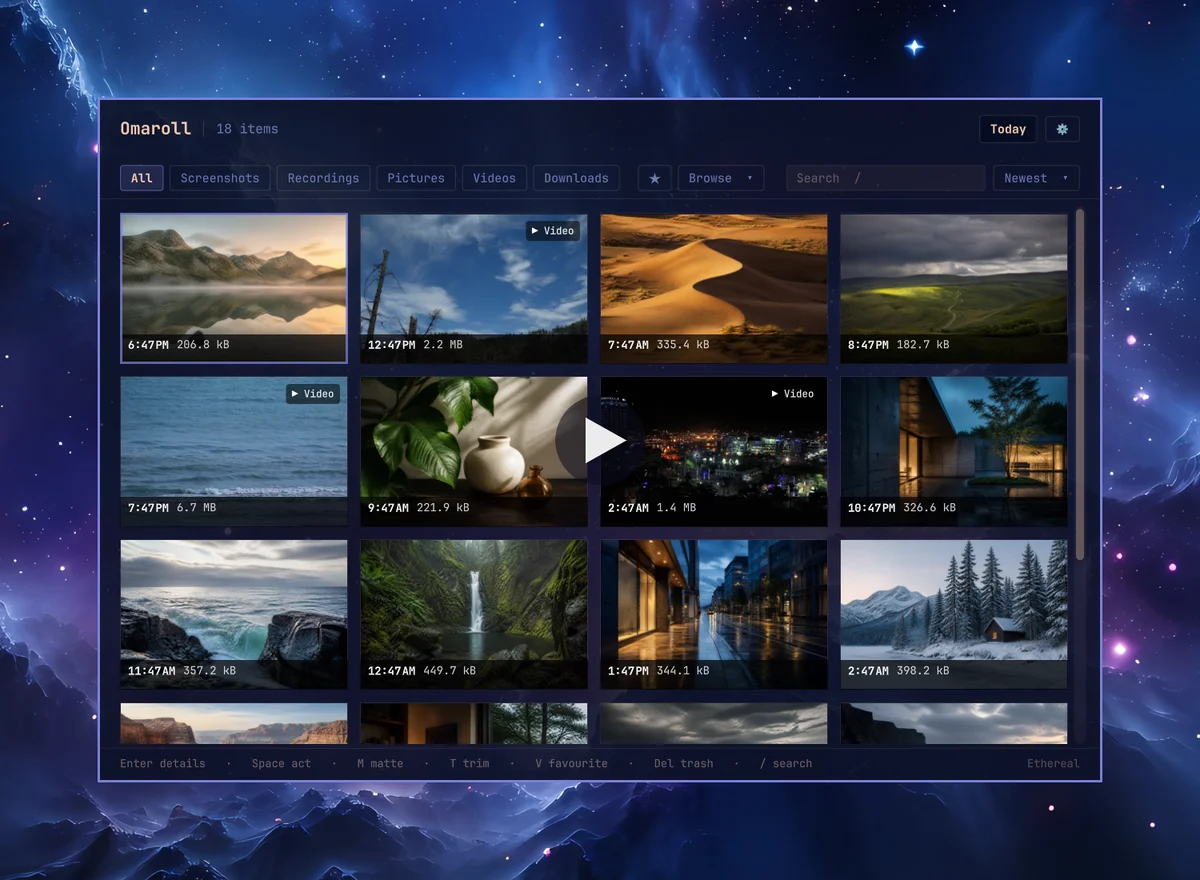
Omaroll is a fast image and video viewer that turns your media folders into a library. Built for Omarchy, as an independent community project.
Omarchy ships a very good capture stack and then saves everything to folders. Omaroll is the part that comes after: finding the thing again, and doing the obvious next thing with it.
Highlights
One library for everything you capture. Screenshots, recordings, pictures, videos and downloads, grouped by day, newest first. Add any other folder from Settings and switch between folders from the library bar.
Knows what each file is. Omarchy stamps its captures with a predictable name, so a screenshot is a Screenshot even when it lives next to every other image in ~/Pictures.
A viewer with every action beside the picture. Enter opens a capture large. Images zoom, pan, rotate and animate. Recordings preview muted with a scrub bar and a sound toggle. F11 for fullscreen, F5 for a slideshow of any folder, album, search or filtered view.
The tools you already have, one key from the file. T sends a recording to omacut, A sends a screenshot to tensaku or $OMARCHY_SCREENSHOT_EDITOR, and the action list runs omarchy-transcode, mpv, tesseract, zbarimg, Pinta, imv, LocalSend and Nautilus. A tool that is not installed is shown greyed with the package to install, not hidden.
Make it postable. The one thing Omaroll does natively: six finished backgrounds derived from the screenshot's own dominant colour, the same six every time for the same file. Pick one and it is on your clipboard and sa
 Omaroll v1.8.0 NEW