Download TryOmarchy.exe below, or let your installed launcher update itself. Your guest disk, files and settings carry over.
Drop files straight into apps. Drag a file from File Explorer onto a browser upload area, an editor or an image viewer in Omarchy and that app gets it. The file is also saved to Downloads. Keep the mouse still for a moment after you let go; if it moves, the file just stays in Downloads. Dropping onto a Files folder copies straight into that folder, as before.
Unlock 1Password with Windows Hello. If you've paired Windows Hello for sudo and installed 1Password in Omarchy, run sudo try-omarchy-windows-hello onepassword enable and turn on "Unlock using system authentication" in 1Password. The unlock button then asks for Windows Hello, and canceling falls back to your guest password. 1Password still asks for its account password after it restarts.
Port forwards change without a restart. Adding or removing a local forward under Settings > Advanced takes effect within a couple of seconds. LAN forwards and SSH still change at the next launch.
Older installs catch up on packages. Running Update > Omarchy now installs packages that newer Try Omarchy images depend on, so features like app drops work on installs created by older versions.
Safer Windows Hello sudo. Only this Omarchy's own VM can ask for approval, sudo from an SSH session into Omarchy uses the password, an interrupted request no longer confuses the next one, and after you cancel a prompt that terminal uses the password for 30 seconds. The p
Download TryOmarchy.exe below, or let your installed launcher update itself. Your guest disk, files and settings carry over.
Windows Hello for sudo. Optional. In an Omarchy terminal, run sudo try-omarchy-windows-hello enable, enter your guest password once, and approve the Windows passkey prompt. After that, each sudo asks for Windows Hello instead of your password. The prompt only appears while the Omarchy window is in front, and canceling it falls back to your password. sudo try-omarchy-windows-hello disable turns it off and removes the passkey. Trial accounts don't use a sudo password, so this matters once you've set up your own account.
Theme switches no longer flash. Changing themes used to blank the Omarchy window for a moment and could snap a resized window back to an older size.
Dark title bar. The Omarchy window's title bar now follows your Windows light or dark setting, and changes with it.
Hold Alt to switch windows. Holding Alt and tapping Tab now keeps Alt held inside Omarchy, so window switchers that stay open while Alt is down work the way they do on a normal PC.
More reliable setup downloads. If a download link stops working after the file already finished downloading, setup now uses the finished file instead of failing.
Current Arch packages in the guest image.
Resizing the window still dims the display briefly while Omarchy adjusts. See the compatibility guide for hardware requirements and known limits.
Pinch to zoom on a Windows 11 Precision Touchpad. It is on by default in GPU mode with one display, and -disable-pinch turns it off. Existing guests pick up the touchpad rules on their first boot of the new image; a guest whose Hyprland input.lua cannot be updated safely keeps ordinary touchpad input.
Send Ctrl+Alt+Delete to Omarchy with Ctrl+Alt+End while its window is focused. Windows reserves Ctrl+Alt+Delete for its security screen, so it cannot be passed through.
A Hyprland input.lua exported to a real Omarchy install no longer fails on the missing Try Omarchy rules file.
Update the guest to Linux 7.2.7 and systemd 262 with current Arch packages.
Switch Windows playback and recording devices while Omarchy runs. Saving audio choices in Settings reroutes the running VM, and Omarchy's own audio picker lists the Windows speakers and microphones so a choice made there is saved back to Windows. Choices carry across guest reboots.
An idle VM no longer holds the Windows speaker open before anything plays.
Update the bundled runtime to the source-built r20c WINQ-EMU build. Turning microphone access on or off still takes effect at the next VM start.
WINQ-EMU r20c runtime component and corresponding source archives for the next signed Try Omarchy app release. This is not a standalone launcher or a new app version.
Built from the source-locked recipe at commit 3ae8213ce5436eb6ec551f764360f08784e19b18 in Runtime run 35931045895. SHA256SUMS covers both archives. r20c adds live SDL audio routes, so Windows playback and recording endpoints can change while the guest runs, and defers the initial playback open so an idle VM does not hold the Windows speaker. The AMD Windows 11 laptop passed a signed candidate with this runtime, including GPU desktop, live routing, reboot persistence and idle release; see the physical record.
The currently published v0.2.0 app still pins r19. The next signed app release will pin r20c.
WINQ-EMU r19 runtime component and corresponding source archives for the next signed Try Omarchy app release. This is not a standalone launcher or a new app version.
Built from the source-locked recipe at commit 751a845359c98f0d31af9d5deee9d3d31ac5497f in Runtime run 35852652612. SHA256SUMS covers both archives. The r19 patch adds WHPX free-page reclamation; the launcher enables balloon reporting only when runtime provenance includes this patch. The AMD Windows 11 laptop passed measured 4 GiB guest memory return and reuse plus a full GPU desktop boot; see the physical record.
The currently published v0.1.0 app still pins r18. A future signed app release will pin r19 after its candidate checks.
The first normal 0.x Try Omarchy for Windows release. Download TryOmarchy.exe below and run it on a 64-bit Windows 10 or 11 PC with hardware virtualization enabled. Existing preview installations retain their guest disk, files, and settings. Older launchers update through the signed v0.0.20-preview bridge before reaching this version.
Open Settings before boot, then choose Launch Omarchy. Start-menu and Desktop shortcuts can optionally launch Omarchy directly, with a separate Settings shortcut. Settings can also launch Omarchy at Windows sign-in and open it fullscreen.
A second installation preserves shortcuts owned by the first and places its own launchers beside the new installation when those Windows shortcut names are already in use.
Choose playback and microphone devices for the next boot. An unavailable saved device falls back to the Windows default.
Use Alt+Tab inside the focused Omarchy window, and Ctrl+Alt+Tab for the Windows task switcher.
Use camera and microphone access controls, the clipboard, folder sharing, file drops, snapshots, backups, recovery, and GPU rendering with automatic CPU fallback.
Hosts that support nested virtualization can run nested Linux workloads. Hosts without it continue to boot Omarchy normally.
Send a diagnostic bundle with a structured bug report when hardware or startup problems arise.
The Precision Touchpad pinch bridge is experimental and disabled by default. Graphics acceleration depends on the Windows driver; automatic CPU rendering is available when the GPU path fails. An
WINQ-EMU r18 support archives for Try Omarchy v1.0.0. These are runtime and corresponding source assets, not a standalone Try Omarchy launcher release.
Built from the source-locked recipe at commit 5b01ecfe6b068a4bc53bde2b9a95a7b9e33b3d18 in Runtime run 35794436367. SHA256SUMS covers both archives. The Windows Precision Touchpad pinch bridge in this runtime remains opt-in.
Camera, microphone and file-drop improvements for Windows x64.
Use the Windows camera and microphone in guest apps. Camera capture starts on demand and stops when the app closes it.
Drop Windows files into an open local Files folder without a transfer window taking over. Other destinations use Downloads with a notification. Duplicate names keep both files.
Existing guests receive matching camera and TUN modules automatically. Interrupted module delivery retries on the next boot.
Recover from orphaned package-manager locks after interrupted updates, without removing locks owned by a running transaction.
Pause the guest during Windows sleep and resume it on wake with clock synchronization.
Existing installations keep their disk, files and settings. Use Update > Omarchy inside the guest for the full system package update.
This remains a preview. Windows sleep/wake recovery has not been verified on physical hardware. Direct drops into arbitrary applications, portable-drive lifecycle, native migration and broader Windows/GPU coverage remain unfinished. Accelerated RAM resume and Windows ARM64 are not supported.
Thanks to everyone testing and reporting issues, and to the Omarchy, WINQ-EMU, QEMU and Mesa communities.
A reliability preview. Download TryOmarchy.exe below and run it on Windows x64. Existing installations keep their guest disk, files, and settings. The launcher updates its guest integration automatically; use Update > Omarchy inside the guest for the full system package update.
What's new
Lighter portable copies. Creating a portable copy, or copying an existing portable installation, now writes an independently verified QCOW2 disk directly instead of staging a full backup and raw restore. Moves and snapshots also retry transient Windows file locks.
Clean guest package ownership. The guest runtime package no longer claims the two Neovim helper commands owned by the editor package. Existing guests keep both helpers, including administrator edits, and the package database reports no duplicate ownership.
Restored Neovim theming. New accounts get the packaged Neovim theme link again, and existing guests receive it when the launcher integration updates. Neovim follows the active Omarchy theme, and omarchy-nvim reports no missing files.
Validation and remaining preview limitations
Automated launcher, guest, and factory-image checks pass on the pinned candidate. The guest update path was exercised end to end on the checksum-verified v0.0.18-preview image, including the five-boot preservation run and the new compatibility-revision delivery, and the physical Windows draft test verifies preserved data, the new kernel boot, reboot and poweroff, rollback, and the one-time compatibility repair before publication.
A larger Windows preview with better file sharing, recovery tools, and graphics reliability. This is the recommended upgrade from v0.0.14-preview, the previous public release; it includes the changes developed in the unpublished v0.0.15�17 candidates.
Download TryOmarchy.exe below and run it on Windows x64. Existing installations keep their guest disk, files, and settings. The launcher updates its guest integration automatically; use Update > Omarchy inside the guest for the full system package update.
What's new
Copy files and folders between Windows and Omarchy. Clipboard transfers preserve originals, and dedicated transfer windows support native Windows drag and drop and larger transfers.
Snapshots and recovery. Create snapshots, restore a separate copy, or roll back an installation with disk verification and recovery data retained if something interrupts the operation.
Move your installation from Settings. Verified copying, cancellation, interrupted-move recovery, and shortcuts that follow the new location make moving to another drive easier.
More accessible Settings. Adjust guest resources, disk capacity, rendering, displays, and sharing. Settings remain usable on smaller screens, and disk reclaim now has tray access and progress reporting.
Better configuration migration. Native monitor settings and the Omarchy runtime location survive restoration. Incomplete package or theme restoration is reported, and repeated restores retain separate backups.
v0.0.14-preview follows v0.0.13-preview from earlier today. It ships a rebuilt guest image (integration revision 12) and a launcher fix worth not waiting for.
Fixed
Choosing Suspend inside Omarchy no longer freezes the VM window. The guest can no longer enter the S3 or S4 sleep states, and new guests have Omarchy's suspend-off toggle on so the system menu does not offer it.
A runtime archive that is unchanged between releases is kept instead of being downloaded and unpacked again.
New
The guest follows the Windows display language, alongside the time zone and keyboard layout it already follows. The locale is generated inside Omarchy and takes effect at the next login. -locale overrides it.
Existing guests catch up with the image defaults on the first boot after an image update, without touching anything you changed: an untouched monitors.lua gets the current profile, the toggles an older image switched on by mistake are removed, and Suspend leaves the system menu.
New guest images include the Noto CJK fonts.
File drag and drop and file clipboard transfers are not included yet. Use Omarchy Shared for files.
v0.0.13-preview follows v0.0.12-preview. It ships a rebuilt guest image (integration revision 9) and a launcher that adapts to the machine it runs on. Existing guest disks keep their data and gain the new guest services on the next launch.
New
Images cross the clipboard in both directions: a screenshot copied in Windows pastes into Omarchy, and an image copied in Omarchy pastes into Windows apps. Text keeps working as before.
The guest follows the Windows time zone and default keyboard layout, and a small guest agent keeps the Omarchy clock in step with Windows, including after sleep. A layout or zone chosen inside Omarchy stays until Windows changes.
Automatic rendering remembers when this PC cannot run the GPU path and goes straight to CPU rendering on later launches, retrying daily or after a runtime or driver change. A new Rendering setting (Automatic, GPU, CPU) overrides it. New guests on CPU rendering start with animations off; existing guests keep their current setting.
Guest CPUs are sized to the machine (all logical processors but two, between two and eight) with a Guest CPUs setting and -cpus. CPU rendering also gets a larger automatic RAM ceiling; GPU rendering keeps its 6 GiB.
The VM window remembers its size and position between launches.
Try Omarchy registers under Windows Apps & features and can be removed from there, from Remove Try Omarchy in Settings, or with -uninstall, with a full backup offered first.
TryOmarchy.exe -reclaim gives the space of deleted Omarchy files back to Windows after the next shutdown, within a budget th
v0.0.12-preview replaces v0.0.11-preview. It ships a rebuilt guest payload with Linux 7.2.3 and current Arch packages. Existing guest disks keep their data and receive the updated clipboard bridge on the next launch.
New
Backup, restore, and reset controls in Settings for stopped standard installs, plus -backup and -restore on the command line. Backups cover the guest disk, boot files, bundled runtime, and settings, and every file is checksum-verified on restore. Restore creates a separate installation with its own shortcuts and never replaces an existing one.
Reset offers a full backup first, prepares the new disk before moving the old one, and keeps the previous disk in a recovery folder
Disk capacity setting for standard installs with in-place growth and Windows free-space information. Lowering the setting never shrinks an existing disk.
First-run choice between Local AppData and another local drive or folder, remembered across launches and shortcuts
Windows folder pickers for install locations and shared folders, and an optional repair when preferences are unreadable
Stable-release update support with a bridge for older preview launchers
Official Omarchy mark in the app icon, setup splash, and VM window
Fixed
Clipboard sharing after reconnects and when copying an earlier value again; trailing newlines are kept, failed sends retry, and overlapping transfers no longer suppress a later copy
Interrupted setup reuses a completed download after a server outage or an ignored resume request, verified before use
v0.0.11-preview replaces v0.0.9-preview and the withdrawn v0.0.10-preview. It includes all changes since v0.0.8-preview.
New
Recommended Omarchy Shared folder for moving files between Windows and Omarchy. It opens once when first attached, stays pinned in Files, and is available from the tray.
Tray menu for reopening Omarchy, opening the shared folder, Settings, diagnostics, and clean shutdown
Settings for fullscreen, memory, folder sharing, port forwarding, and SSH keys, plus a Start menu Settings shortcut
Offline portable USB mode with persistent guest data
Loopback-only SSH and port forwarding
Redacted diagnostics bundles and try-omarchy-export
Omarchy 4.0.2 for new and reset guests
yay, base-devel, clang, Omarchy's Neovim configuration, screen recording, and missing menu and keybinding tools
Fixed
Upgraded v0.8 through v0.10 guest disks now receive the current launcher integration without replacing the guest or user data
Updates are verified before switching versions, and a failed first boot restores the previous guest and runtime
Folder sharing works with CPU rendering through the bundled runtime
Unsafe or unavailable shared folders no longer prevent startup
Startup no longer fails solely because nested virtualization is unavailable
Reduced idle CPU use from excessive QEMU redraw polling
Reduced QEMU HDA audio underruns
Fixed notification close behavior and kept notifications private on the lock screen
Fixed Settings opening behind the Omarchy window
File drag and drop and file clipboard transfers are not included yet.
Fixed the launcher quitting on its own after about half an hour. Omarchy kept running, but the Windows key and every Windows shortcut went back to Windows, and the window could no longer be closed normally.
Fixed setup blaming your connection when the real problem was a full disk.
Removed a stall of about a minute when the bundled runtime rolled back to its previous version.
Added resumable downloads so an interrupted setup continues where it stopped instead of fetching the payload again, with bounded retries when antivirus or indexing briefly locks a finished file.
Added version details to the launcher, so Explorer, Task Manager and the Windows permission prompt now show Try Omarchy instead of a blank entry.
Added a source-locked CI build for the patched Windows QEMU runtime, including matching source, licenses, package inventory, provenance, and per-file hashes.
Added isolated signed test launchers so runtime candidates can be exercised without changing the production payload.
Hardened runtime packaging and validated clean setup, CPU fallback, scoped Windows-key handling, clipboard sharing, shutdown, relaunch, and persistent guest data in a nested Windows VM.
Made text clipboard sharing survive late guest startup, Wayland reconnects, early Windows copies, and temporary Windows clipboard contention.
Updated the guest image to nautilus 50.3 and fd 10.5.
Known limitation: Win+L still locks Windows instead of reaching Omarchy. Windows reserves that shortcut and no application can intercept it, so rebind the Omarchy action if you need it.
Added CI for launcher builds, release-pin validation, and guest patch contracts.
Added a two-phase release workflow that rebuilds and smoke-tests the guest, signs the optimized launcher through Azure OIDC, and verifies public downloads before marking a release Latest.
Added authenticated automatic updates for the launcher, bundled runtime, and factory guest image, with staged installs and automatic rollback after a failed first boot.
Added bounded retries for temporary DNS, connection, rate-limit, and server failures during setup downloads.
Made instant-mode credentials explicit in the account choice, setup splash, and a one-time first-desktop notification.
Removed the duplicate Windows pointer over the guest-rendered cursor, with -host-cursor retained as a diagnostic fallback.
Thanks to everyone testing Try Omarchy on real hardware and over remote sessions.
Try Omarchy can now take you straight to the desktop with a ready-to-use trial account. This release also adds branded Start-menu and Desktop shortcut choices, plus a compatibility guide for common Linux apps and packages.
Thanks to Marx-Bray for suggesting the launcher shortcuts in issue #1, and to everyone testing Try Omarchy across different Windows setups.
This preview polishes the first-run experience and fixes the rough edges found during launch-day testing.
Reworked the setup splash with a clear SUPER-key explanation and starter shortcuts
Added safe cancellation that stops downloads, removes partial setup data, and keeps the launcher
Authenticated the release manifest before downloading payloads and added recovery for incomplete installs
Prevented QEMU from trapping the Windows cursor in RDP sessions
Added essential keys, uninstall instructions, compatibility notes, and a FAQ
Thanks to Tom Ballard for the manifest hardening and incomplete-install recovery in PR #2. Thanks also to everyone who tested the early previews and reported the problems that shaped this release.
The EXE is signed with Azure Trusted Signing. It uses the unchanged Omarchy image and WINQ-EMU payload from v0.0.3-preview.
Download: TryOmarchy.exe (8 MB, signed). Open it - first run switches on Windows' virtualization if needed (one permission prompt, one restart; machines with Memory Integrity on skip this entirely), downloads the GPU runtime and the Omarchy image, and boots you into setup. Checksum in TryOmarchy.exe.sha256.
---
Same Omarchy 4.0.1 image as v0.0.2 plus two guest-side fixes for the native app shell: a reboot-notify unit (reports reboot intent on lifecycle port 4450, so TryOmarchy.exe relaunches instead of exiting even when stock WHPX QEMU wedges during guest reset) and a silenced clipboard-bridge push when no host listener is up.
Hardware-validated on a Ryzen 5 5625U laptop: regression, runtime download, signed-binary smoke, close guard, clipboard, folder sharing, reboot lifecycle. The exe is signed with Azure Trusted Signing (publisher: Brandon South).
Second preview image. Omarchy 4.0.1 (was 4.0.0.alpha), all 22 upstream themes, screensavers working out of the box (ttfx + hypridle), Venus ICD (vulkan-virtio) preinstalled, permanent SDDM autologin written by first-boot provisioning (no greeter, ever), baked-in two-way clipboard bridge, /mnt/host automount for the launcher's -Share folder, and a visible cursor under SDL.
Validated end to end under KVM before publishing: setup form to desktop, reboot straight back into the desktop, 3.45s to graphical.target on the test box. Use scripts/bootstrap.ps1 from the repo to install; rerun with a deleted %LOCALAPPDATA%\TryOmarchy\guest to upgrade from v0.0.1, and launch with -Fresh.
Guest image built from jorge-huxley/try-omarchy-win (win branch) plus the patches in guest-build/.
First developer preview: Omarchy boots to a rendered Hyprland desktop under QEMU/WHPX on Windows. CPU rendering only (llvmpipe, SSE4.2-tier flags — see docs/FINDINGS.md for the WHPX XSAVE cliff). Validated in a nested dev environment; bare-metal validation in progress. Use scripts/bootstrap.ps1 from the repo. Guest image built from the pinned Omarchy revision via jorge-huxley/try-omarchy-win's x86_64 builder.
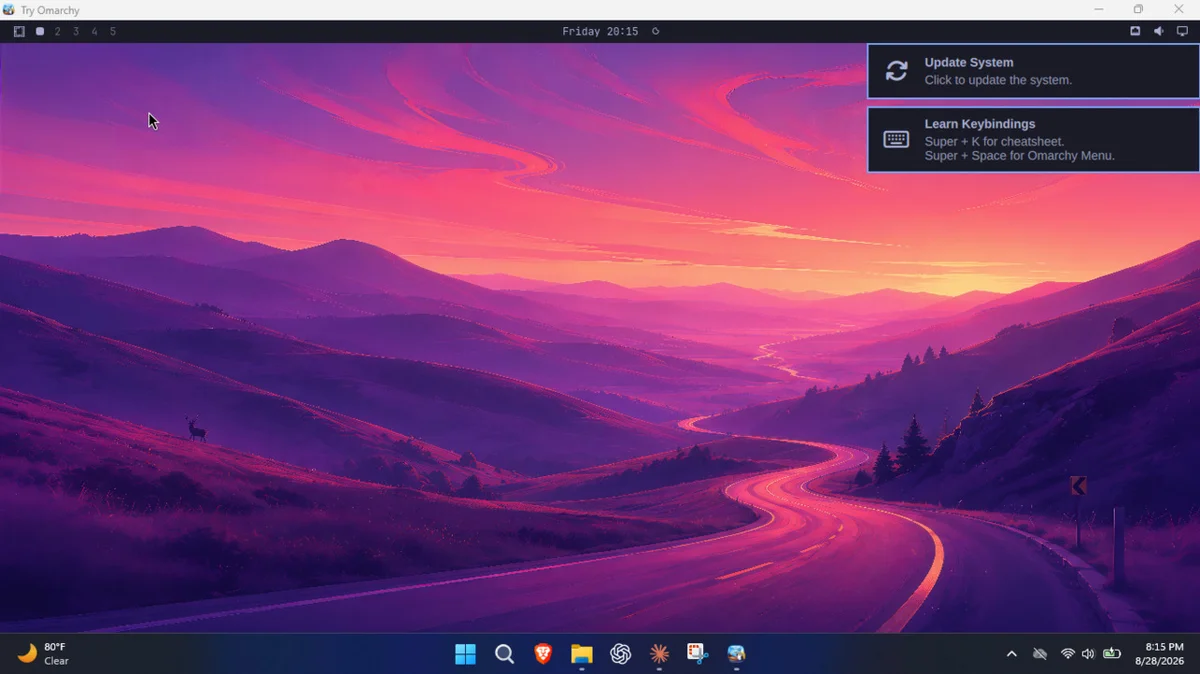
 Try Omarchy v0.6.0 NEW